Home








About
In this code snippet, we’ll learn how to use the bitwise operators in Javascript.
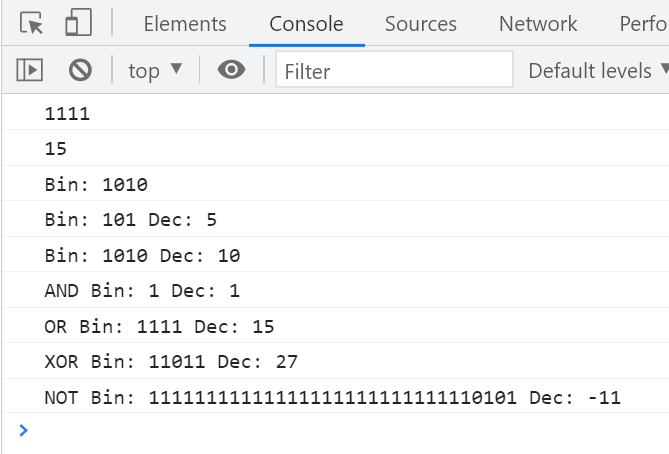
Bitwise operators allow us to work and manipulate the actual bits and perform bitwise operations like AND, OR, XOR, NOT, ...
Let’s see the code example below.
Code:
//Bin to dec and vice versa conversions.///////////////

console.log(decToBin(15));
console.log(binToDec("1111"));

function decToBin(value){
  return (value >>> 0).toString(2);
}

function binToDec(value){
  return parseInt(value, 2).toString(10);
}

///////////////////////////////////////////////////////


//Bitwise operators.//////////////////////////////////

let number = 10; //1010 in binary

//Show original value in binary.
console.log("Bin: " + decToBin(number));

//Shift 1 bit right by adding a 0 to the front(left). Last bit gets removed: 1010 => 0101
number = number >>> 1; //If >> is used it will push copies of the leftmost bit to the right.
console.log("Bin: " + decToBin(number) + " Dec: " + number);

//Shift 1 bit left. A 0 gets added as the last bit: 101 => 1010
number = number << 1;
console.log("Bin: " + decToBin(number) + " Dec: " + number);


//AND: 0011 & 0101 => 0001
number = 3 & 5;
console.log("AND Bin: " + decToBin(number) + " Dec: " + number);

//OR 1010 | 1101 => 1111
number = 10 | 13;
console.log("OR Bin: " + decToBin(number) + " Dec: " + number);

//XOR 0001 0100 ^ 0000 1111 => 0001 1011
number = 20 ^ 15;
console.log("XOR Bin: " + decToBin(number) + " Dec: " + number);

//NOT 1010 => 11111111111111111111111111110101 =>10101
//All the zeros that were ommited before will now turn into 1.
//Also the sign bit will now be a 1 thus making the number negative.
number = ~ 10;
console.log("NOT Bin: " + decToBin(number) + " Dec: " + number);

///////////////////////////////////////////////////////
Resulting output:
About
In this code snippet, we’ll learn how to check and convert data types in Javascript.
Let’s see the code example below.
Code:
//Check data types.//////////////////////////////////////////////////

let var1 = "5";
let var2 = 5;
let var3 = false;
let var4 = { property: "I'm a property" };
//...


checkDataType(var1);
checkDataType(var2);
checkDataType(var3);
checkDataType(var4);

function checkDataType(variable){
  //Using typeof to checking the data type.
	switch(typeof variable){
  	case "string": console.log("It's a string!");
    break;
    case "number": console.log("It's a number!");
    break;
    case "boolean": console.log("It's a boolean!");
    break;
    case "object": console.log("It's an object!");
    break;
    case "function": console.log("It's a function!");
    break;
    case "undefined": console.log("It's undefiend!");
    break;
  }
}

/////////////////////////////////////////////////////////////////////


//Data type conversions./////////////////////////////////////////////

//Convert string to int.
let intVar = parseInt("5"); //The Number() function does the same.
//convert int to string.
let stringVar = intVar.toString(); //The String() function does the same.
//Convert string to float.
let floatVar = parseFloat("5.5"); //The Number() function does the same.

/////////////////////////////////////////////////////////////////////
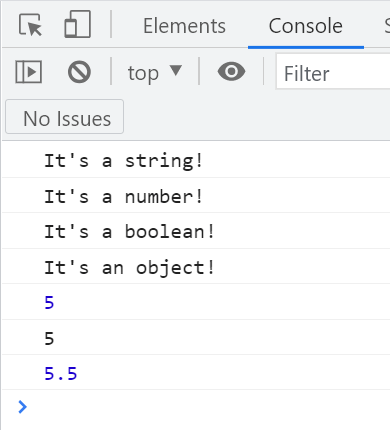
Resulting output:
About
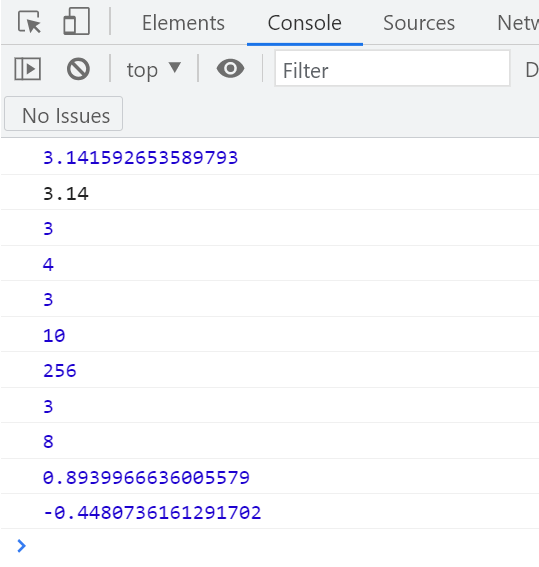
In this code snippet, we’ll check out some of the Math class functions in Javascript.
More information about all the functions and constants here.
Let’s see the code example below.
Code:
//You can get constants from the Math class.
let pi = Math.PI;

//Display a certain amount of decimal places.
console.log(pi);
console.log(pi.toPrecision(3));

//Round number.
console.log(Math.round(pi));
//Round up.
console.log(Math.ceil(pi));
//Round down.
console.log(Math.floor(pi));
//Get the absolute value of a number.
console.log(Math.abs(-10));

//Do exponentiation. 2^8
console.log(Math.pow(2,8));
//Get squre root of a number.
console.log(Math.sqrt(9));
//Gets base 2 log of 256.
console.log( (Math.log(256)/Math.log(2)) );

//Trigonometric functions.
console.log(Math.sin(90));
console.log(Math.cos(90))
Resulting output:
About
In this code snippet, we’ll learn how to sort and reverse arrays in Javascript.
Let’s see the code example below.
Code:
let numbers = [ 3, 8, 7, 1 ];
let characters = [ "c", "s", "a", "n" ];
let strings = [ "car", "truck", "bike" ];

//Sort////////////////////////////////////////////////////

numbers.sort(); //Will sort array numerically.
console.log(numbers);


characters.sort(); //Will sort array alphabetically.
strings.sort(); //Will sort array alphabetically.
console.log(characters);
console.log(strings);

/////////////////////////////////////////////////////////


//Reverse////////////////////////////////////////////////

numbers.reverse(); //Will reverse elements in the array.
console.log(numbers);

/////////////////////////////////////////////////////////
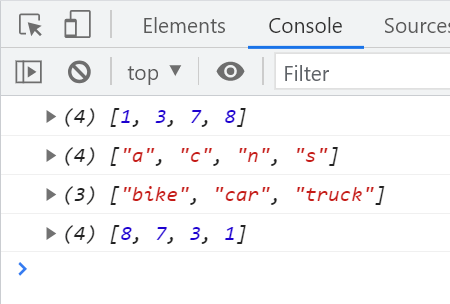
Resulting output:

About
In this code snippet, we’ll learn how to use some of the Javascript string manipulation functions.
Let’s see code the example below.
Code:
let someString = "Hello World!";

//Get string length.
console.log(someString.length);
//Check if a string includes another string.
console.log(someString.includes("Hello"));
//Find index of string within string.
console.log(someString.indexOf("Hello"));
//Split string into an array of strings when a certain chracter is encountered.
console.log(someString.split(" "));
//Gets the specifed part of a string.
console.log(someString.substring(0, 2));
//Replaces the specified part of string with the provided string.
console.log(someString.replace("Hello", "Goodbye"));
//Regular expressions can be used with with functions like match(), search(), replace().
console.log(someString.replace(/Hello/, "Goodbye"));
//Make all letters lower case.
console.log(someString.toLowerCase());
//Make all letters upper case.
console.log(someString.toUpperCase());
//Add any desired string at the beginning.
console.log(someString.padStart(2, "Text: "));
//Add any desired string at the end.
console.log(someString.padEnd(2, "!!"));
//Remove spaces.
console.log(someString.trim());

//Brake up a string only in code for better readability.
someString = "A very long string \
can be broken up by \
using a backslash.";
console.log(someString);

//Escape a character.
someString = "If you want to insert a backslash into a string you must escape it by writting it twice like so: \\";
console.log(someString);
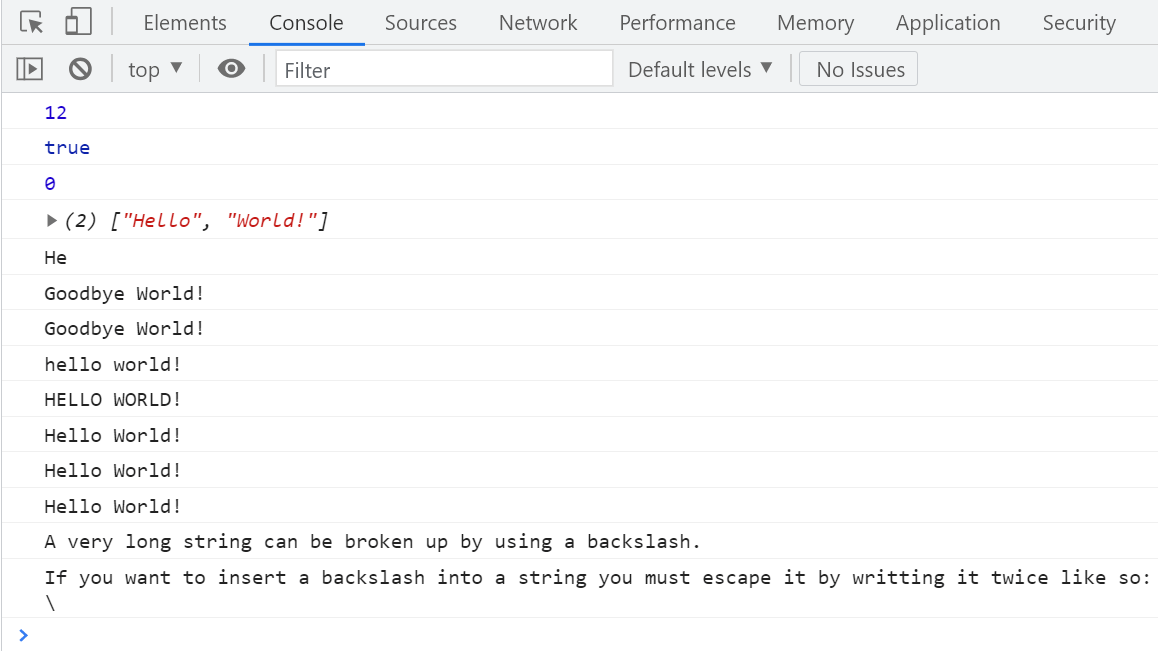
Resulting output:
About
In this code snippet, we’ll learn about objects in Javascript.
Objects can contain other objects, functions, properties and act as a sort of container for them. This is useful for transferring/storing data, modeling real world objects and for grouping a certain set of related functions and variables into one place.
I won’t go into detail about objects or OOP here. I’ll just demonstrate how to make and work with them.
Let’s see how to make an object in Javascript in the example below.
Code:
//Create object with properties and functions./////////////////
let MyPC = {
	CPU: "Ryzen 9 3900X",
  RAM : "64GB 3466MHz",
  GPU : "RTX 2080 SUPER",
  getSpecs : function() {
    //If you want to access a property you must reference the object it's in.
    //If you need it inside the same object it was defined in you can use the "this" keyword.
    return "CPU: " + this.CPU + " RAM: " + this.RAM + " GPU: " + this.GPU;
  },
  listSpecs: function() {
    console.log(this.getSpecs());
  },
};

//Calling the objects functions.
MyPC.listSpecs();

//This is just for a more readable output in the console.
console.log("------------------------------------------------");

//Change property value
MyPC.CPU = "AMD " + MyPC.CPU;

//Accessing properties.
console.log(MyPC.CPU); 		//1. way
console.log(MyPC["GPU"]); //2. way

///////////////////////////////////////////////////////////////

console.log("------------------------------------------------");

//Adding properties////////////////////////////////////////////

MyPC["HDD"] = "2TB SDD";
console.log(MyPC["HDD"]);

///////////////////////////////////////////////////////////////

console.log("------------------------------------------------");

//List all the object members./////////////////////////////////

//1. way, put the object in a for in loop.
for(let key in MyPC)
	console.log("Key: " + key);

console.log("------------------------------------------------");

//2. way, get object key as array and iterate through that.
myPcKeys = Object.keys(MyPC);

for(let key of myPcKeys)
	console.log("Key: " + MyPC[key]);

///////////////////////////////////////////////////////////////

console.log("------------------------------------------------");

//Property getters/setters/////////////////////////////////////

const MyScreen = {
	Resolution : "4K",
  get resolution() { //Getter implementation in js.
  	//Here you can do some extra logic/validation before getting the value.
    return this.Resolution;
  },
  set resolution(resolution) { //Setter implementation in js.
  	//Here you can do some extra logic/validation before setting the value.
    this.Resolution = resolution;
  }
}

console.log("My screen resolution is " + MyScreen.resolution);

///////////////////////////////////////////////////////////////
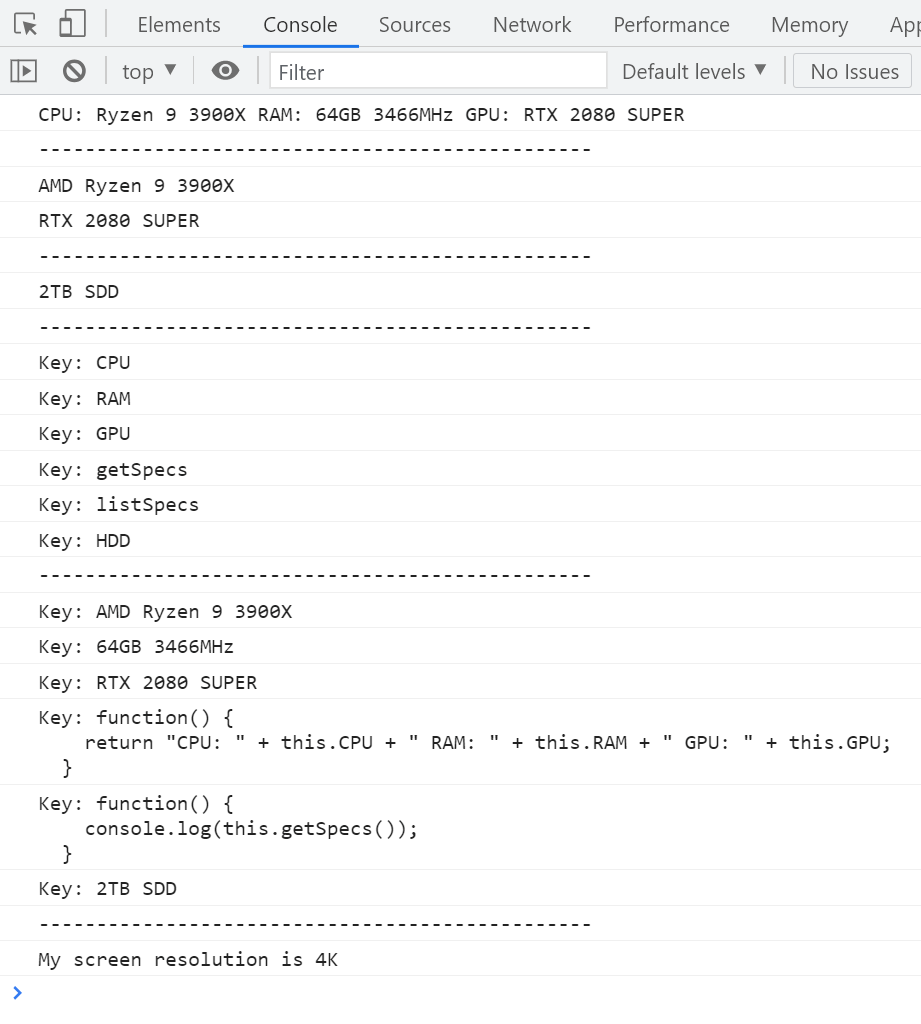
Resulting output:

About
In this code snippet, we’ll learn about JSON serialization/deserialization in Javascript.
JSON or javascript object notation is a data format/structure for storing/transporting data. It’s supported by a wide variety of programming languages. It’s short, concise, easy to read/write and understand.
In Javascript, you can use the JSON.stringify() method to turn an object into a JSON string and JSON.parse() to turn a JSON string into an object.
Let’s see the example below.
Code:
//Just a demo object for serialization.
let languages = {
	title: "Programming Languages",
  languages: [
  	"Java",
    "Javascript",
    "C",
    "C++",
    "C#",
    "PHP",
    "Python"
  ]
}

//Serialize object to json.
let json = JSON.stringify(languages);
console.log(json);

//Deserialize json to object.
let languagesDeserialized = JSON.parse(json);
console.log(languagesDeserialized);
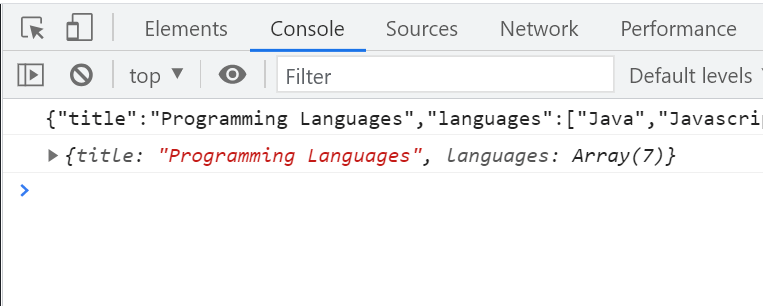
Resulting output:

About
In this code snippet, we’ll learn about the const keyword in Javascript.
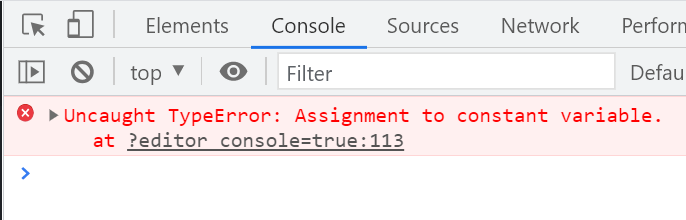
The const keyword does almost exactly the same thing to a variable as the let keyword. You can read more about let in this post. The difference is it also makes the variable a constant meaning it can only have its value assigned once.
Let’s see the example below.
Code:
const number = 5;

//number = 5; //This won't work with const variables.
Resulting output:
About
In this code snippet, we’ll learn about the let keyword in Javascript.
In Javascript variables declared with the var keyword can do some pretty weird stuff with like being used before being declared, declaring the same variable multiple times and no variable scope. Coming from a language like C# these “features” seem absolutely awful to me. Luckily the let keyword was added in ES6. If a variable is declared with let it behaves pretty much like you would expect a variable to behave in any other programming language. More specifically the variable has to be declared before being used, it’s scoped and can be declared only once per scope.
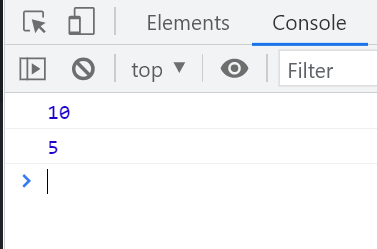
Let’s see the example below.
Code:
//console.log(number); //This won't work with let variables.

let number = 5;

MyFunction();

function MyFunction(){
	let number = 10; //This will just override the original value of the variable while within this functions scope.
  console.log(number);
	let text = "Hello."
}

console.log(number);

//console.log(text); //This won't work with let variables.
Resulting output:
About
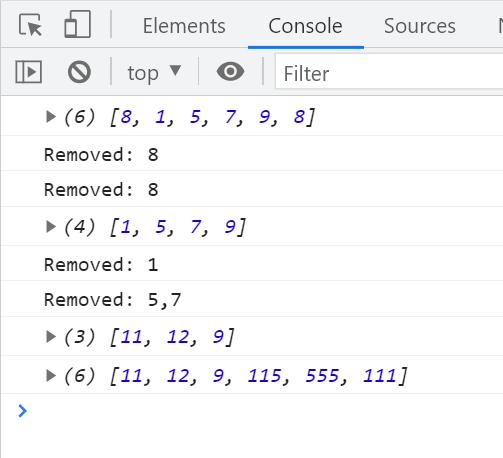
In this code snippet, we’ll find out how to add/remove elements to/from an array in Javascript.
At some point you will probably have the need to add or remove some item from an array.
Here’s how you do it:
Code:
let numbers = [ 1, 5, 7, 9 ];

//Add element///////////////////////////////////////////

numbers.unshift(8); //Will add an element at the beginning of the array.
numbers.push(8); //Will add an element at the end of the array.

console.log(numbers);

///////////////////////////////////////////////////////

//Remove element///////////////////////////////////////

console.log("Removed: " + numbers.shift()); //Will remove and return the first element of the array.
console.log("Removed: " + numbers.pop()); //Will remove and return the last element of the array.

console.log(numbers);

///////////////////////////////////////////////////////

//Remove/add element at////////////////////////////////

console.log("Removed: " + numbers.splice(0, 1)); //Remove 1 element from index 0.
console.log("Removed: " + numbers.splice(0, 2, 11, 12)); //Add 2 elements(11 and 12) at index 0.

console.log(numbers);

///////////////////////////////////////////////////////

//Join arrays./////////////////////////////////////////

let someMoreNumbers = [ 115, 555, 111 ];

console.log(numbers.concat(someMoreNumbers));

///////////////////////////////////////////////////////
Resulting output: