Home





About
In this code snippet, we will learn how to use object and collection initializers in C#.
Initializers let you set any accessible property at the point of creation of an object or collection(without having to invoke the constructor). This can make it easier and faster to create objects/collections. And by faster, I mean faster for you to implement as a programmer not faster performance-wise.
Let’s see how to use initializers in the code example below.
Code:
using System;
using System.Collections.Generic;

namespace Initializers
{
    class Program
    {
        static void Main(string[] args)
        {
            //Object initializer.
            var MyObject = new MyClass { Number = 4, Text = "four" };

            //Collection initializer (used together with object initializer).
            List<MyClass> myList = new List<MyClass>() {
              new MyClass {Number = 1, Text = "one"},
              new MyClass {Number = 2, Text = "two"},
              new MyClass {Number = 3, Text = "three"}
            };

            //As you can see creating a new list of objects can be much quicker an easier using initializers compared to using the normal way.
        }
    }

    class MyClass
    {
        public int Number { get; set; }

        public string Text { get; set; }
    }
} 
About
In this code snippet, we will find out how to use recursion in C#.
A recursive function/method is a method that calls itself. The method will contain an if else block. If the condition is met a value will be returned else the method will continue calling itself.
Recursion usually decreases the complexity of your code compared to an iterative approach but it’s also usually slower than iteration. You would use recursion when it makes sense to do so. A good example of when recursion should be used is when you have a tree data structure to look through. The files system is arranged in just such a way and is a good candidate for recursive iteration.
In this post, I made a recursive file iterator that looks through the file system recursively and writes out all the files.
The code below contains an example of a recursive method that finds the factorial of the passed-in number.
Code:
using System;

namespace Recursion
{
    class Program
    {
        static void Main(string[] args)
        {
            Console.WriteLine(factorial(5));

            Console.ReadLine();
        }

        public static int factorial(int n)
        {
            //If the exit/break out condition is met 1 is returned, else the method will continue calling itself.
            if (n == 0)
            {
                return 1;
            }
            else
            {
                return n * factorial(n - 1);
            }
        }
    }
}
Resulting output:

About
In this code snippet, we will see how to use enumerations in C#.
An enum is a data type. To create an enumeration you have to give it a name and define a list of constants that will be available when that enumeration is referenced.
In this code example, we will simulate a key being pressed. The getKey() method will return the key that was pressed. We could just return a string like so “left“. But making an enum with predefined values is much less error-prone than using a string. A misspelled string won’t get caught at compile time meanwhile if you misspell or chose a nonexisting enum an error will occur at compile time.
Let’s have a look at the code below.
Code:
using System;

namespace Enumeration
{
    class Program
    {
        static void Main(string[] args)
        {
            //Simulate the key being pressesd.
            KeyPressed key = getKey();

            //Check what key was pressed.
            showPressedKey(key);

            Console.ReadLine();
        }

        public static void showPressedKey(KeyPressed key)
        {
            //If we are unsure what type of enum was given to us we can use this useful bit of code
            //to check weather a certain value is defined in our enum type.
            if (Enum.IsDefined(typeof(KeyPressed), key))
            {
                //If so this code executes.
                if (KeyPressed.up == key)
                {
                    Console.WriteLine("The up arrow key was pressed.");
                }
                else if (KeyPressed.down == key)
                {
                    Console.WriteLine("The down arrow key was pressed.");
                }
                else if (KeyPressed.left == key)
                {
                    Console.WriteLine("The left arrow key was pressed.");
                }
                else if (KeyPressed.right == key)
                {
                    Console.WriteLine("The right arrow key was pressed.");
                }

            }
            else
            {
                //Otherwise tell us that the key is undefined.
                Console.WriteLine("Undefined key!");
            }
        }

        public static KeyPressed getKey()
        {
            return KeyPressed.left;
        }

        //Define the enum and all it's possible values.
        public enum KeyPressed
        {
            up,
            down,
            left,
            right
        }
    }
}
Resulting output:

About
In this code snippet, we’ll see how to use method output parameters in C#.
The output parameter works by passing in a reference of the variable you provide. It is very similar to the ref keyword. You put the out keyword in front of the parameter you want to use as an “output”. The method can still have a data type and return a value as the output parameter isn’t really outputting anything but is rather accessing the variable you passed it via reference.
Let’s look at the code below to see how to use and implement output parameters.
Code:
using System;

namespace OutputParameters
{
    class Program
    {
        static void Main(string[] args)
        {
            int num1 = 50;
            int num2 = 20;

            double result = 0;

            //Using the isDivisible method we will check if the two provided numbers can be divided.
            //If the numbers can be devided the the method will return true and the result will get output via the output parameter.
            if (isDivisible(num1, num2, out result))
            {
                Console.WriteLine("Result: " + result);
            }
            else
            {
                Console.WriteLine("Numbers not divisible.");
            }

            Console.ReadLine();
        }

        public static bool isDivisible(int num1, int num2, out double outoutParameter)
        {
            bool divisible = false;

            if (num1 != 0 && num2 != 0)
            {
                divisible = true;
                outoutParameter = num1 / num2;
            }
            else
            {
                divisible = false;
                outoutParameter = 0;
            }

            return divisible;
        }
    }
}
Resulting output:


About
In this code snippet, we’ll take a look at anonymous methods in C#.
Anonymous methods don’t have names(obviously). They can be defined with the delegate keyword or by using the lambda expression. They can then be put into a variable of type delegate.
Here is how to implement an anonymous method.
Code:
using System;
using System.Collections.Generic;
using System.Linq;

namespace AnonymousMethod
{
    class Program
    {
        static void Main(string[] args)
        {
            //Examples of anonymous methods using delegate.
            Func<string> method = delegate() { return "Hello."; };
            Console.WriteLine(method());

            Console.WriteLine("");

            //Examples of anonymous methods using the lambda expression.
            Func<int, int, int> add = (a, b) => a + b;
            Func<int, int> sub10 = a => { return a - 10; };

            Console.WriteLine(add(10, 15));
            Console.WriteLine(sub10(15));

            Console.WriteLine("");

            //Example of a anonymous metod
            List<int> numbers = new List<int>() { 1, 5, 8, 9 };

            var query = numbers.Where(n => n > 2);

            foreach (var item in query)
            {
                Console.WriteLine(item);
            }

            Console.ReadLine();
        }
    }
}
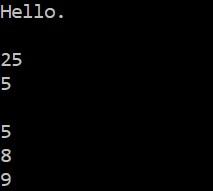
Resulting output:

About
In this code snippet, we’ll find out what the abstract keyword does in C#.
Classes and their members such as methods, properties, … that are marked with abstract keyword aren’t fully implemented. Abstract classes aren’t meant to be instantiated but are only meant to be inherited from. This means that class members(methods, properties, …) marked with the abstract keyword must be implemented in the child class.
Let’s look at the example below.
Code:
using System;

namespace AbstractClass
{
    class Program
    {
        static void Main(string[] args)
        {
            MyChildClass MCC = new MyChildClass();

            MCC.myAbstractMethod();

            Console.ReadLine();
        }
    }

    //This abstract class can't be instantiated. It can only be used to inherit from.
    //Abstract members will have to be implemented in the derived class.
    abstract class MyClass
    {
        public abstract void myAbstractMethod();
    }

    class MyChildClass : MyClass
    {
        //Implementation of the myAbstractMethod() method.
        public override void myAbstractMethod()
        {
            Console.WriteLine("From myAbstractMethod.");
        }
    }
}
Resulting output:

About
In this code snippet, we’ll take a look at queues and stacks in C#.
Stacks and queues are similar to lists in the way that they don’t require their size to be declared on creation and elements can be dynamically added or removed. In fact, all of the above(queues, stacks, and lists) are part of the same collections namespace and implement some of the same interfaces.
But unlike lists stacks work according to the LIFO(Last In First Out) concept. Simply put the first item you add or push on to the stack will be the last item to get removed or popped off the stack.
Queues on the other hand work according to the FIFO(First In First Out) concept. The first item to get added or enqueued will also be the first one to get removed or dequeued.
Let’s look at the code example below.
Code:
using System;
using System.Collections.Generic;

namespace QueueAndStack
{
    class Program
    {
        static void Main(string[] args)
        {
            //Queue is FIFO(First In First Out).
            Queue<MyClass> myQueue = new Queue<MyClass>();

            //Stack is LIFO(Last In First Out)
            Stack<MyClass> myStack = new Stack<MyClass>();


            //Add items to queue by enqueueing them.
            myQueue.Enqueue(new MyClass("1"));
            myQueue.Enqueue(new MyClass("2"));
            myQueue.Enqueue(new MyClass("3"));

            //Add items to stack by pushing them on.
            myStack.Push(new MyClass("1"));
            myStack.Push(new MyClass("2"));
            myStack.Push(new MyClass("3"));


            //Peek() is a useful method as it just looks at the value without removing the item.
            Console.WriteLine("Peek queue: ");
            Console.WriteLine(myQueue.Peek().Text);
            Console.WriteLine("");

            Console.WriteLine("Peek stack: ");
            Console.WriteLine(myStack.Peek().Text);
            Console.WriteLine("");


            //Dequeue() removes the first item in queue and returns it.
            Console.WriteLine("Dequeue: ");
            Console.WriteLine(myQueue.Dequeue().Text);
            Console.WriteLine("");

            //Pop() removes the last item on the stack and returns it.
            Console.WriteLine("Pop: ");
            Console.WriteLine(myStack.Pop().Text);
            Console.WriteLine("");

            //As you will be able to see the items were removed after dequeueing/poping.
            foreach (MyClass item in myQueue)
            {
                Console.WriteLine("Queue: " + item.Text);
            }

            Console.WriteLine("");

            foreach (MyClass item in myStack)
            {
                Console.WriteLine("Stack: " + item.Text);
            }

            Console.ReadLine();
        }
    }

    class MyClass
    {
        public MyClass(string text)
        {
            Text = text;
        }

        public string Text { get; set; }
    }
}
Resulting output:


About
In this code snippet, we’ll find out how to use lists in C#.
Lists are similar to arrays, but unlike arrays, they are more flexible. You can add and remove items from lists without having to make a new list and destroying the entire old one every time you add or remove an element. Also, lists have a lot of useful methods such as find(), exists(), sort(), … You can use intellisense in Visual Studio to explore all the methods available.
Now let’s look at the code example to see how to use lists.
Code:
using System;
using System.Collections.Generic;

namespace List
{
    class Program
    {
        static void Main(string[] args)
        {
            //Create list.
            //List<(data type)> (list name)
            List<MyClass> myList = new List<MyClass>();

            //Add a few items to the list.
            myList.Add(new MyClass("1"));
            myList.Add(new MyClass("2"));
            myList.Add(new MyClass("3"));

            Console.WriteLine("Items in list:");
            Console.WriteLine("");

            //Show items in list.
            showListItems(myList);

            Console.WriteLine("Removing item from list.");
            Console.WriteLine("");

            //Remove item from list
            myList.RemoveAt(1);

            Console.WriteLine("Items in list after removal:");
            Console.WriteLine("");

            //Other things you can do with lists.

            //myList.Reverse(); //Reverses order.
            //myList.Count(); //Gets size of list.
            //myList.Sort(); //Sorts items in list.

            //Show items in list.
            showListItems(myList);

            Console.ReadLine();
        }

        public static void showListItems(List<MyClass> myList)
        {
            //Access items from list.
            foreach (var item in myList)
            {
                Console.WriteLine(item.Text);
            }

            Console.WriteLine("");
        }
    }

    class MyClass
    {
        public MyClass(string text)
        {
            Text = text;
        }

        public string Text { get; set; }
    }
}
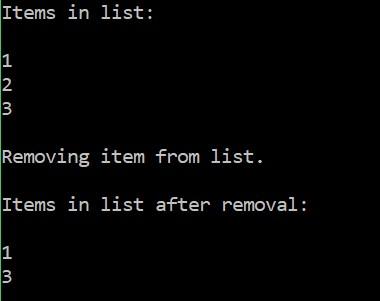
Resulting output:
About
In this code snippet, we’ll take a look at dictionaries in C#.
Dictionaries can hold a collection of objects and are similar to lists. But unlike lists, the objects stored in the dictionary are paired with a key. That key can be used to access the object in the collection.
Now let’s look the code below to see how to use dictionaries.
Code:
using System;
using System.Collections.Generic;

namespace Dictionary
{
    class Program
    {
        static void Main(string[] args)
        {
            //Dictionary<> uses a key - value pair unlike List<>
            //Dictionary<(key data type), (value data type)>
            Dictionary<string, string> myDictionary = new Dictionary<string, string>();

            //Add an item by first adding a key and than the value that will be referenced by the key.
            myDictionary.Add("One", "I am first.");
            myDictionary.Add("Two", "I am second.");
            myDictionary.Add("Three", "I am third.");

            //Show item in dictionary.
            showDictionaryItems(myDictionary);

            //Remove item by key.
            myDictionary.Remove("Two");

            //Show item in dictionary.
            showDictionaryItems(myDictionary);


            //Try to get the value by key.
            string value = "";

            if (myDictionary.TryGetValue("One", out value))
            {
                Console.WriteLine(value);
            }

            //Check if the key exists.
            if (myDictionary.ContainsKey("One"))
            {
                Console.WriteLine("Key exists.");
            }
            else
            {
                Console.WriteLine("Key doesn't exist.");
            }

            //Clear the items.
            myDictionary.Clear();

            //Show item in dictionary.
            showDictionaryItems(myDictionary);

            Console.ReadLine();
        }

        public static void showDictionaryItems(Dictionary<string, string> myDictionary)
        {
            //Get the key and value of each item in the list.
            foreach (var item in myDictionary)
            {
                Console.WriteLine(item.Key + ": " + item.Value);
            }

            Console.WriteLine("");
        }
    }
}
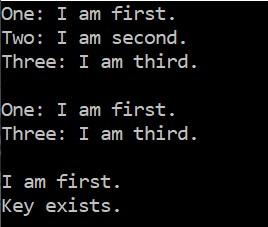
Resulting output:
About
In this code snippet, we’ll find out how to iterate with the for, foreach, while and do while loop.
What loops do is execute the code in their curly brackets(multiple times, maybe only once or even never). The number of times that they will do that depends on the condition that will get evaluated at the beginning of each iteration. Usually, the condition consists of the maximum number of iterations and the counter variable which contains the number of iterations so far. The counter is an integer that gets increased at the end of the loop. This way we can keep track of how many iterations were performed.
But the loop condition doesn’t always have to be implemented like that. The condition is basically an if the statement. If it evaluates to true the loop will keep loping if it evaluates to false the loop will stop. So, you can stick in anything that will evaluate to true or false. Or an actual variable holding a value of true or false.
These are the basics of how a loop works. But as you will see in the code example below there are some differences between these loops. Let’s check out what the differences are and how to implement each loop.
Code:
using System;

namespace Iteration
{
    class Program
    {
        static void Main(string[] args)
        {

            //For loop.
            Console.WriteLine("Iterating with the for loop.");

            //Here i will be the counter.
            //First it gets declared, then we check if it's bigger than 5.
            //The code in the curly brackets gets executed if the check evaluated to true.
            //And at the end i gets increased by one.
            for (int i = 0; i < 5; i++)
            {
                Console.WriteLine(i);
            }

            Console.WriteLine("");


            //While loop.
            Console.WriteLine("Iterating with the while loop.");

            int j = 0;

            while (j < 5)
            {
                Console.WriteLine(j);
                j++;
            }

            Console.WriteLine("");


            //Do while loop.
            //Always executes at least once.
            Console.WriteLine("Iterating with the do while loop.");

            int k = 0;

            do
            {
                Console.WriteLine(k);
                k++;
            } while (k < 5);

            Console.WriteLine("");


            //Foreach loop.
            //It executes once fore everya item in array or collection.
            Console.WriteLine("Iterating with the foreach loop.");

            int[] intArray = new int[5] { 1, 5, 6, 8, 4 };

            foreach (var item in intArray)
            {
                Console.WriteLine(item);
            }


            Console.ReadLine();
        }
    }
}
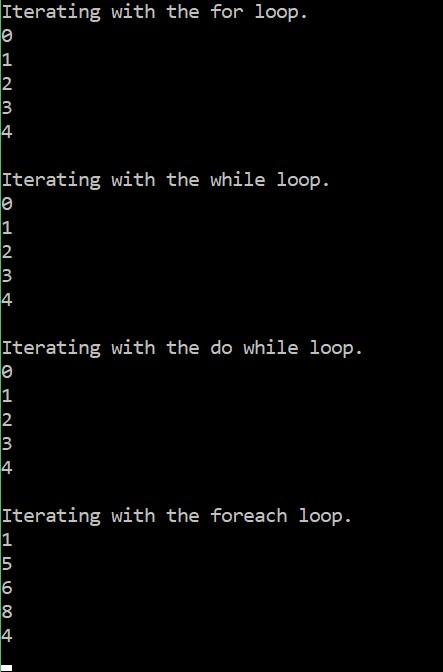
Resulting output: