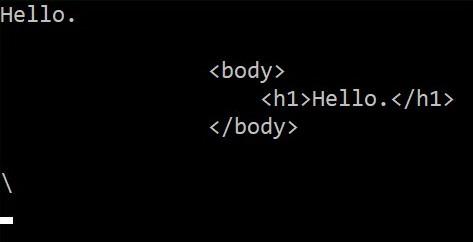
In this code snippet, we will take a look at string literals and the @ character in C#.
In C# the @ character can either be used to make reserved keywords available as variable names or it can be used to make a string literal. A string literal takes everything in the string literally. For example, you do not have to escape a \ with \\ . Your string can now also span multiple rows in the editor. This can be useful when making SQL statements or HTML, XML, …
Let’s have a look at the code below to see how to use the @ character.
Code:
using System;

namespace stringLiteral
{
    class Program
    {
        static void Main(string[] args)
        {
            //1.
            //If prefixed with @ reserved keywords can be used as variable names.
            string @int = "Hello.";

            Console.WriteLine(@int);

            //2.1
            //A string literal enables the string to span multiple rows.
            string literal = @"
                <body>
                    <h1>Hello.</h1>
                </body>
            ";

            Console.WriteLine(literal);


            //2.2
            //No need for escaping characters.
            string literal2 = @"\";

            Console.WriteLine(literal2);

            Console.ReadLine();
        }
    }
}