About
In this code snippet, we will see how to write and read files in C#.
In this example, I will use a console application. If you want to know how to open a file dialog and select/create a file in a WFA application see this post.
First, we will create a file(if it doesn’t already exist) using FileStream. Then we will write some text to the file using the StreamWriter class. Then we’ll use the StreamReader class to read from the file. All these operations need to performed inside a try catch block to prevent the application from crashing if an exception occurs.
Note: You don’t necessarily have to do exactly what was done here to read or write files. Instead of creating a file with FilesStream you could just pass its instance to StreamWriter. You can use the using keywod to simplify your code and avoid using the try catch block …
Let’s have a look at the code below to see how to read and write files.
Code:
using System;
using System.IO;

namespace ReadAndWriteFile
{
    class Program
    {
        static void Main(string[] args)
        {
            writeToFile();
            readFromFile();

            Console.ReadLine();
        }

        public static void writeToFile()
        {
            //Exceptions need to be handled. Otherwise if the file cannot be accesed our application will crash.
            try
            {
                //Path of the file to be read.
                string path = "C:\\Users\\DTPC\\Desktop\\file.txt";

                //Check if the file exist ...
                if (!File.Exists(path))
                {
                    //... if not create it.
                    FileStream fs = new FileStream(path, FileMode.OpenOrCreate, FileAccess.Write);
                    fs.Dispose();
                }

                //Initialize StramWriter by passing it the path of the file.
                StreamWriter sw = File.CreateText(path);

                //Text to be written.
                string text = "Hi!";

                //Write to the file.
                sw.Write(text); //You could use the WriteLine(); method if you want to write to the file line by line.

                Console.WriteLine(text + " was written to " + path);

                //Don't forget to close the StreamReader.
                sw.Close();
            }
            catch (FileNotFoundException)
            {
                Console.WriteLine("No file with such name was found!");
            }
            catch (DirectoryNotFoundException)
            {
                Console.WriteLine("Directory doesn't exist!");
            }
            catch (Exception ex)
            {
                Console.WriteLine("Something went wrong!" + ex.Data);
            }
        }

        public static void readFromFile()
        {
            //Exceptions need to be handled. Otherwise if the file cannot be accesed our application will crash.
            try
            {
                //Path of the file to be read.
                string path = "C:\\Users\\DTPC\\Desktop\\file.txt";

                //Initialize StramReader by passing it the path of the file.
                StreamReader sr = new StreamReader(path);

                //Read from the file and save the string to a variable.
                string message = sr.ReadToEnd(); //You could use the ReadLine() method inside a loop if you want to read the file line by line.

                //Don't forget to close the StreamReader.
                sr.Close();

                //Write out the file contents to the console.
                Console.WriteLine(message + " was read from " + path);
            }
            catch (FileNotFoundException)
            {
               Console.WriteLine("No file with such name was found!");
            }
            catch (DirectoryNotFoundException)
            {
                Console.WriteLine("Directory doesn't exist!");
            }
            catch (Exception ex)
            {
                Console.WriteLine("Something went wrong!" + ex.Data);
            }
        }
    }
}
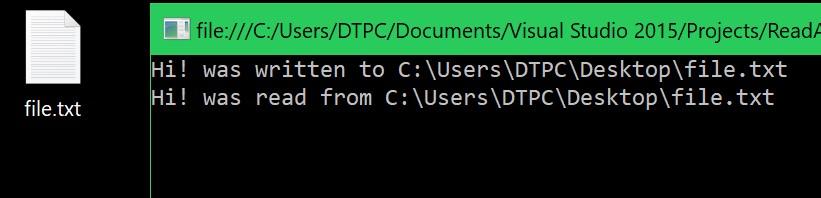
Resulting output: