About
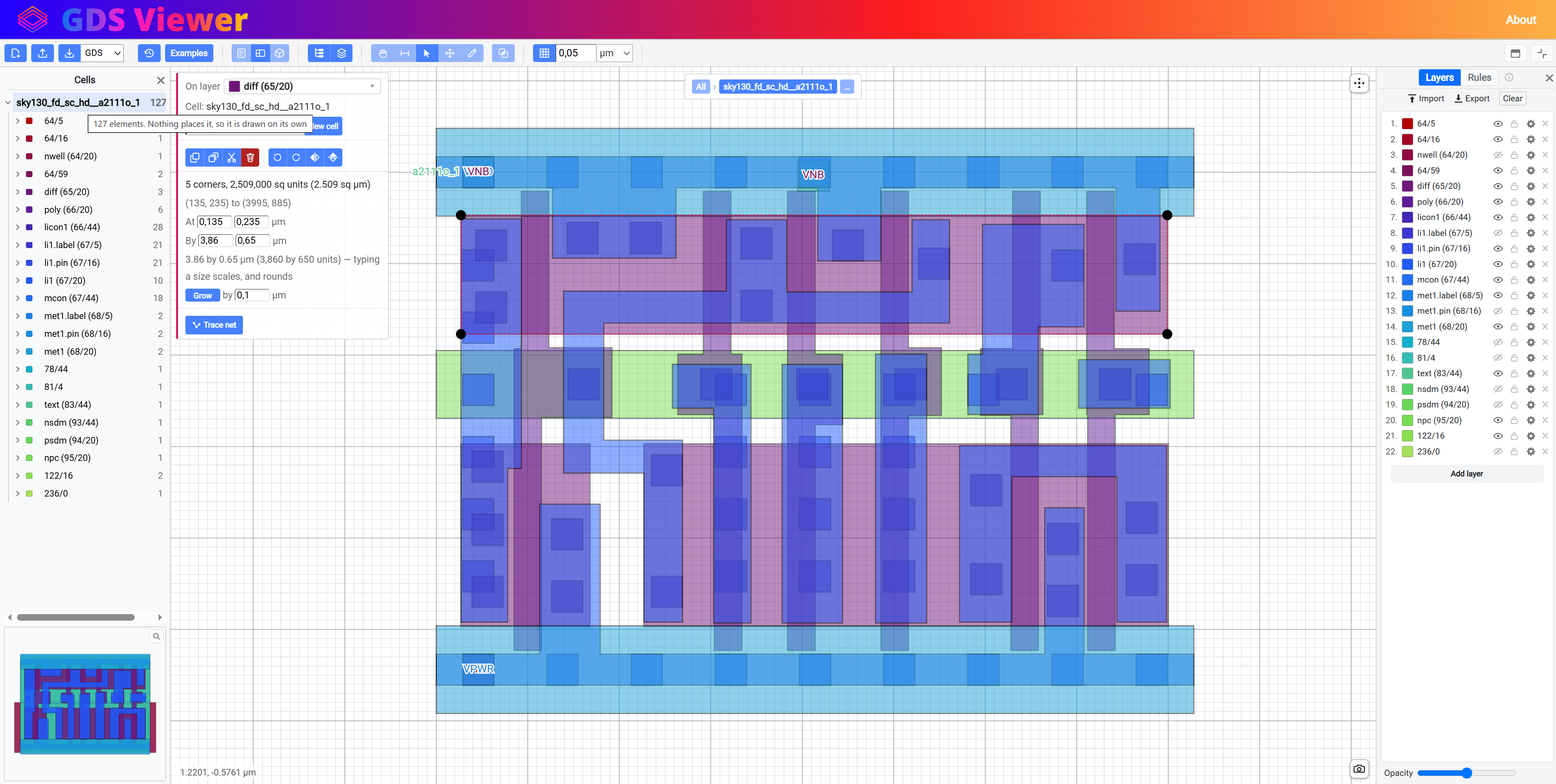
In this post, I’ll talk about the online GDS File Viewer/Editor I made(or I’m making, as it’s still a work in progress). For now, I will make the development version of the app available online so people can find it and test it. Eventually, I will post the code on GitHub, but first I want to add some more features, refactor the code and maybe write some unit tests.
Update: Here’s the link to the GitHub repo.
I got the idea to make an online GDSII viewer some time ago when I took a course to learn how to make an ASIC. When you create your chip design it will get output in the GDS format which can be viewed/modified by the appropriate software. Most of it is not free and open source except Magic, Klayout. Also none of the software I found works in the browser, unlike my app which is a PWA(progressive web app). This makes it cross-platform and much more accessible as you don’t have to install any software, simply visit a web page and that’s it. Additionally, I added a 3D viewer, the ability to see your chip in AR/VR and you can download the 3D model for whatever use(3D printing maybe?).
As I said, there are other programs(including free and open source ones) out there that are better than this one but making my own is more fun and a great learning experience. I got some more practice and experience using Blazor, deploying Blazor and integrating it on a WordPress website(this blog), got to use the three.js library, konva.js library, integrated the Monaco editor, learned about the GDS file format, …
Additionally, my idea for the future is to integrate this viewer into another application I want to make and use it to view the final output GDS(but I will write another post about that at some point in the future).
Update
So, it has been a while, but I finally got to finishing this project. At the time of writing this, it has been more than 3 years since I started this.
As mentioned above, this was meant to be embedded in another project that I later decided wasn’t worth pursuing further, so this project subsequently lost some of its originally intended purpose. Combine this with my lack of time and working on other stuff, I only occasionally worked on this, then did other things and forgot about it, came back to it, then left it again … But it’s done at last.
I updated the UI and added more features; the functionality is now also available as a CLI tool and a NuGet package if you want to use some of the functionality in your own projects.
Note: This still isn’t a proper tool for making ICs or at least I wouldn’t recommend you use it for anything too serious/expensive. This is more useful as a tool that can be used to visualize GDS files on websites, blogs, Obsidian notes, or embedded into other software that just needs a viewer to show the output.